WRITING
Moving the AI Into Excel: A Workflow Migration Forced by 'Regenerate'
I spent an afternoon tuning charts in Excel. One "regenerate" from the AI wiped them all — and it made the same mistake twice.
For the past few months I had an AI generate my hydraulic-engineering workbooks with scripts on my computer. It was genuinely efficient. But the moment I started editing the finished product myself, the whole setup turned against my own work. This post is about how I swapped "the AI generates files from outside" for "the AI moves into Excel and edits in place" — and about the hardest thing to move: the rules.
1. How the Script Era Collapsed
Some background. An ecological-flow calculation for a river in Shaoxing lived in one workbook: a dozen sheets of live formulas, eight charts. The AI generated the whole file with a script on my machine — change one parameter, everything recalculates, every chart redraws. That stage felt great.
Then it collapsed. I opened Excel and hand-tuned the charts: axis ranges, colors, positions. Saved. To me, that was now the final version. Next time I asked the AI to change something else, it did what it always did — regenerated the entire file. Everything I had tuned was gone. The first time I called it an accident. The second time I laid down a rule: "From now on, whatever I edit by hand is the final version. If you want changes, make them on my version."
Worse, the common spreadsheet-processing libraries can't even do "read it in, write it back unchanged" — one read-and-save quietly drops hand-inserted charts. So even a script that only wants to touch one cell can damage the whole file it passes through.
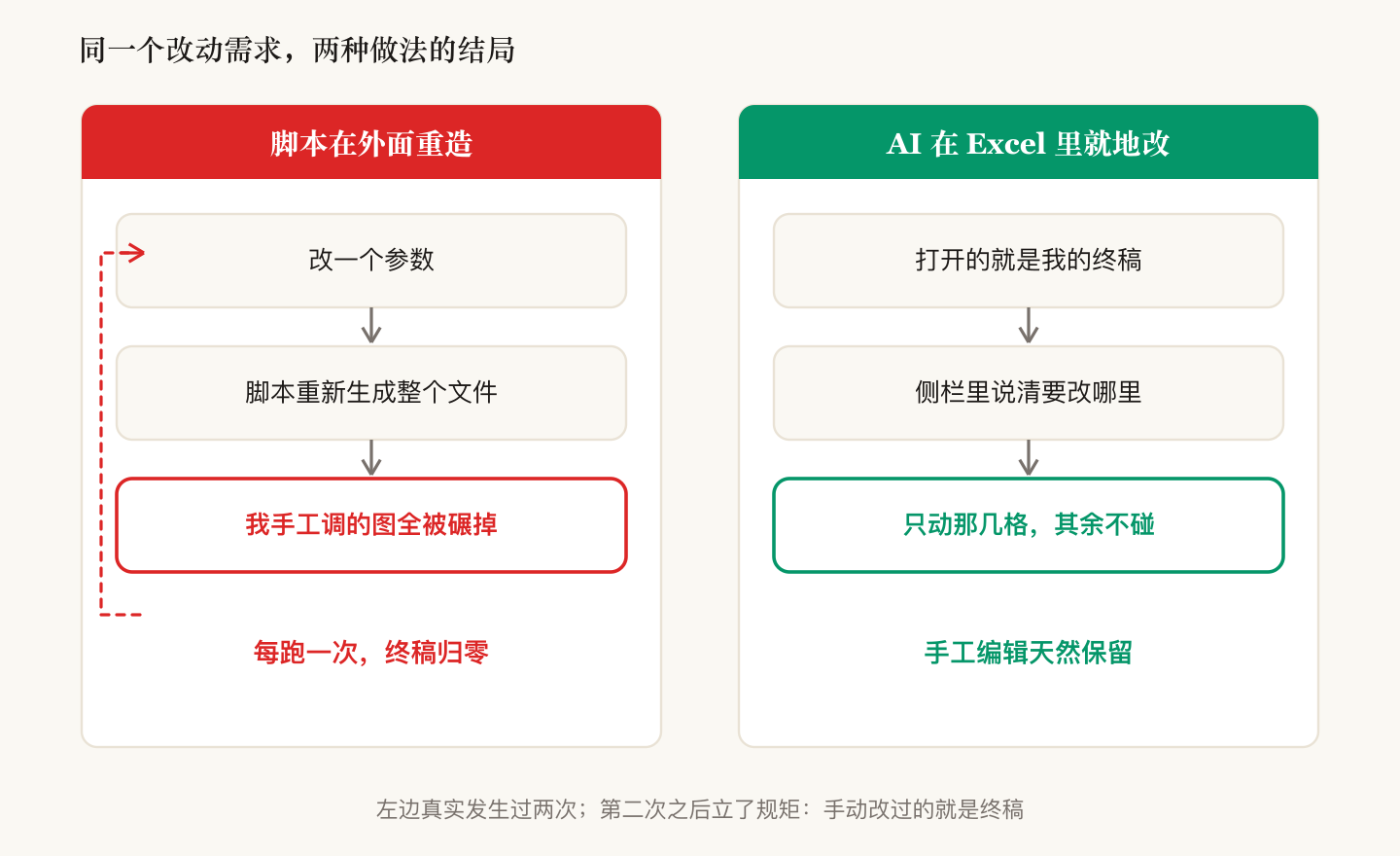
The root cause in one sentence: the script treats the file as a build artifact that can be recreated at any time; I treat the file as a manuscript someone is actively editing. Once a human starts working on the finished product, those two worldviews collide — and the human loses every time.
2. Moving the AI Into Excel — Where It's Blind
The fix wasn't making the scripts more careful. It was changing venues. Claude now ships an official Excel add-in: the AI sits in a sidebar inside the spreadsheet, editing the very file I have open, in place, incrementally. "Protect my final version" went from a discipline I had to keep repeating to a physical default — the add-in simply has no "regenerate the whole file" move.
But once inside, two hard limits surface. First, it cannot see any file on my computer: project documents, parameter provenance, previously settled results — all out of reach. Second, it has no memory across conversations: whatever we align on today is gone, word for word, the next time I open the sidebar.
So the real work wasn't "install an add-in." It was repackaging two years of rules — accumulated in scripts, checkers, and project notes — and delivering them through the three channels the platform actually offers:
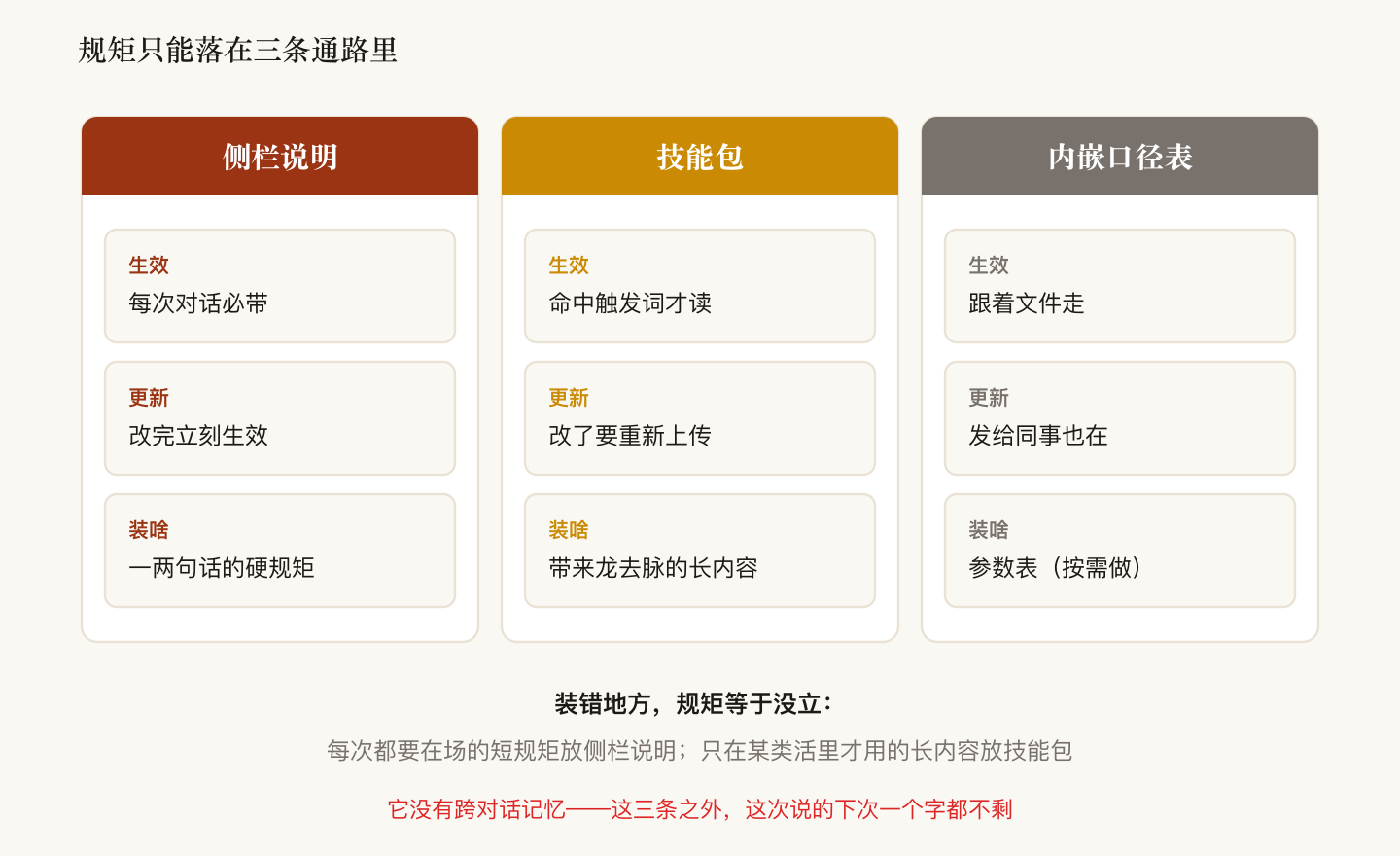
| Channel | When it applies | What belongs there |
|---|---|---|
| Sidebar instructions | Every conversation; edits take effect immediately | Hard rules you can state in a sentence or two |
| Skill packages | Loaded only when trigger words match; changes require re-upload | Long content with context and version history |
| A parameters sheet inside the workbook | Travels with the file, even to colleagues | The parameter table (made on demand) |
3. Two Layers of Packaging: One Generic, One Per Project
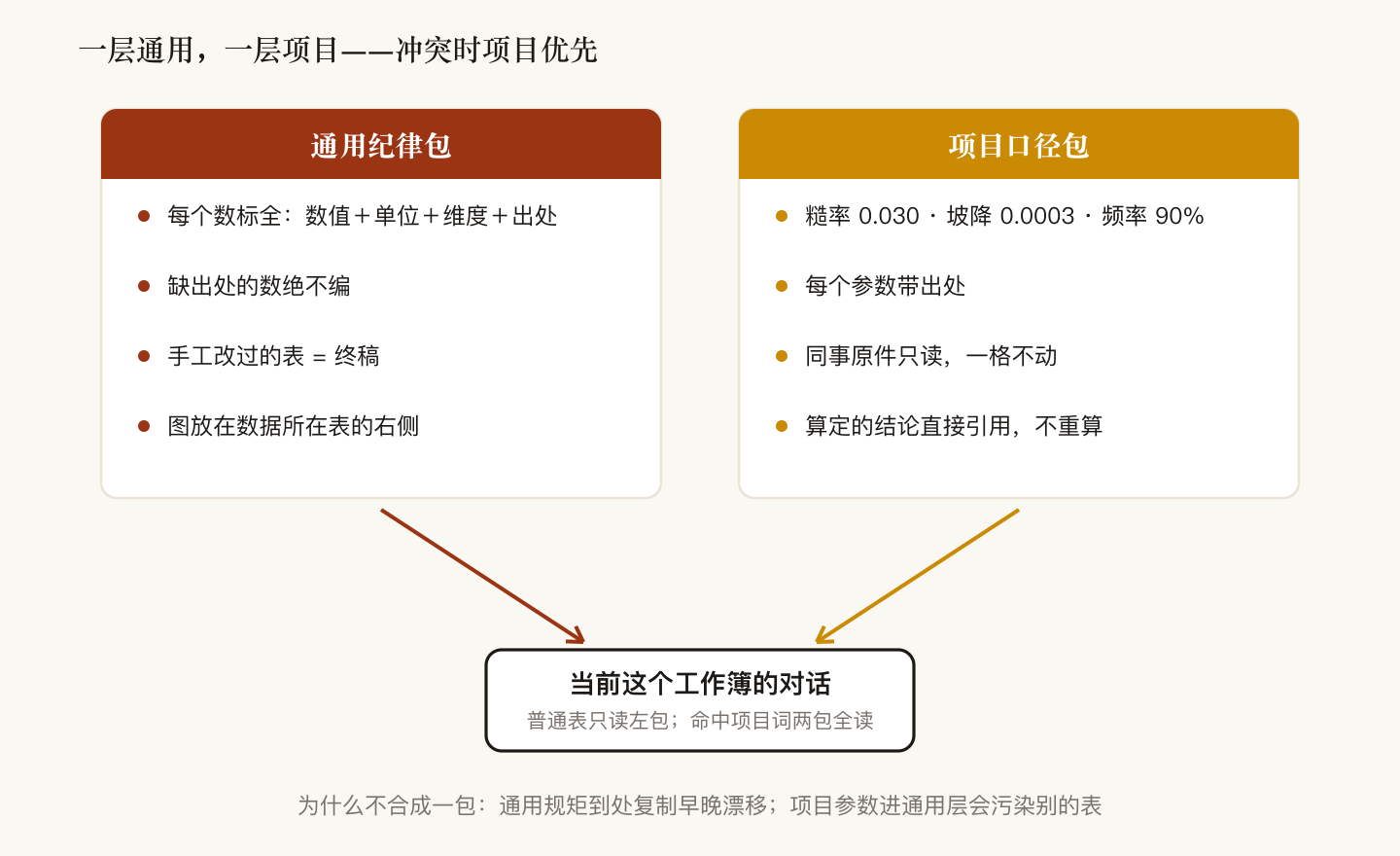
I split the rules into two packages. The generic package holds discipline that applies to any workbook: every number carries value, unit, time basis, and source; never invent a number that lacks provenance; anything I've hand-edited is final; charts live on the same sheet as the data they plot. The project package holds only this project's settled facts: roughness 0.030, slope 0.0003, frequency 90%, each with its source; which files are a colleague's originals that must never be touched; settled results that get cited, not recomputed.
Why not one package? Generic rules copied into every project package drift apart the moment one copy changes. Project parameters pushed into the generic layer leak into unrelated workbooks. Two layers, each with its own job; when they conflict, the project package wins.
The most valuable part of the packages is the incident log — every entry a mistake that actually happened, not a hypothetical:
| Incident | In one line |
|---|---|
| Frozen panes | I said no; it kept adding them as a "good habit" — we ended up scrubbing 26 of them |
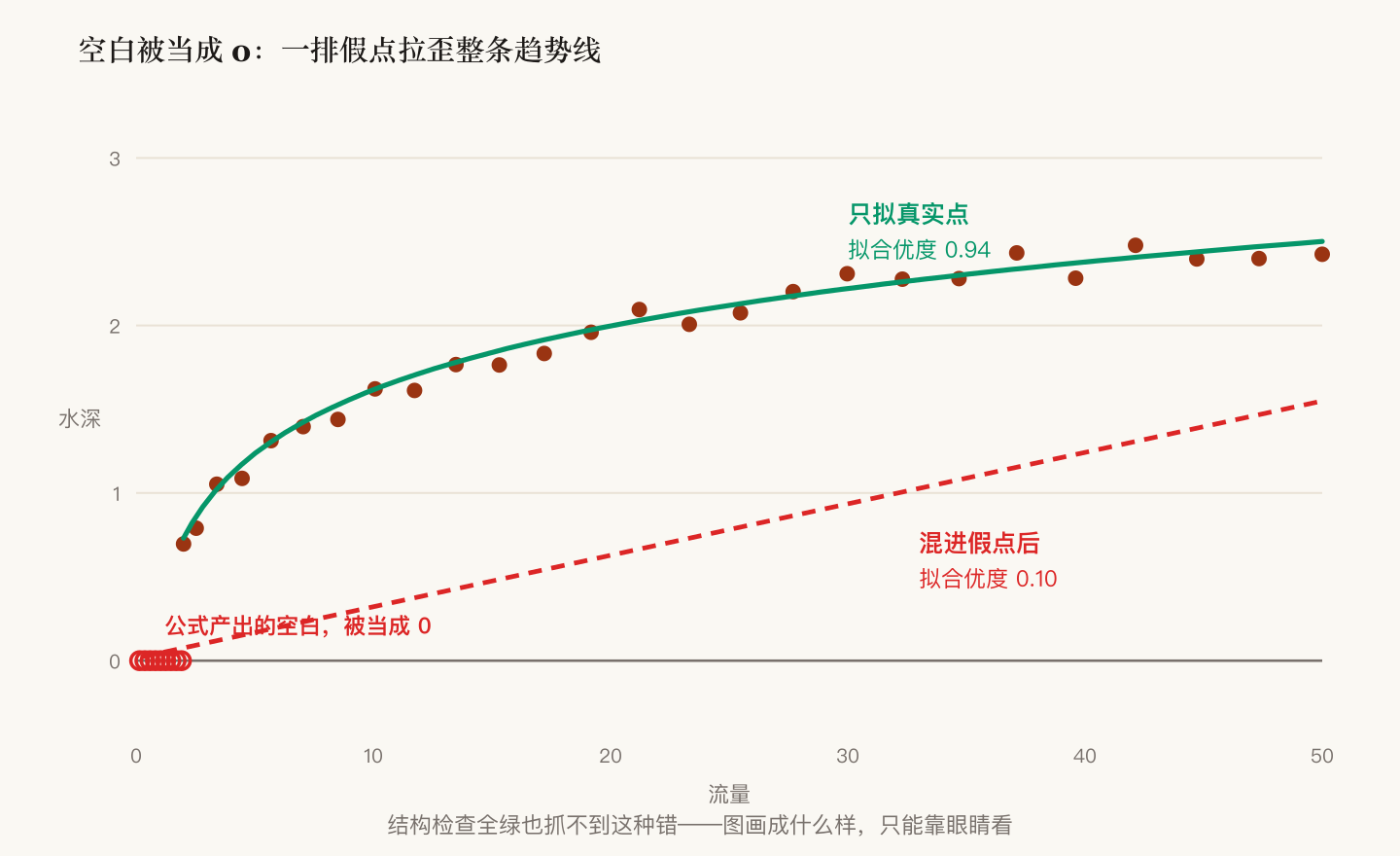
| Invisible fake points | Formula blanks plotted as zeros; the trend line's goodness of fit fell from 0.94 to 0.10 |
| Name collision | A formula name shaped like a cell address; Excel gave no error and the workbook quietly collapsed into division-by-zero |
| Formula overload | Two thousand averaging formulas in one sheet froze the file on open — cells that never vary should hold plain values |
4. It Has No Memory, but the Process Can
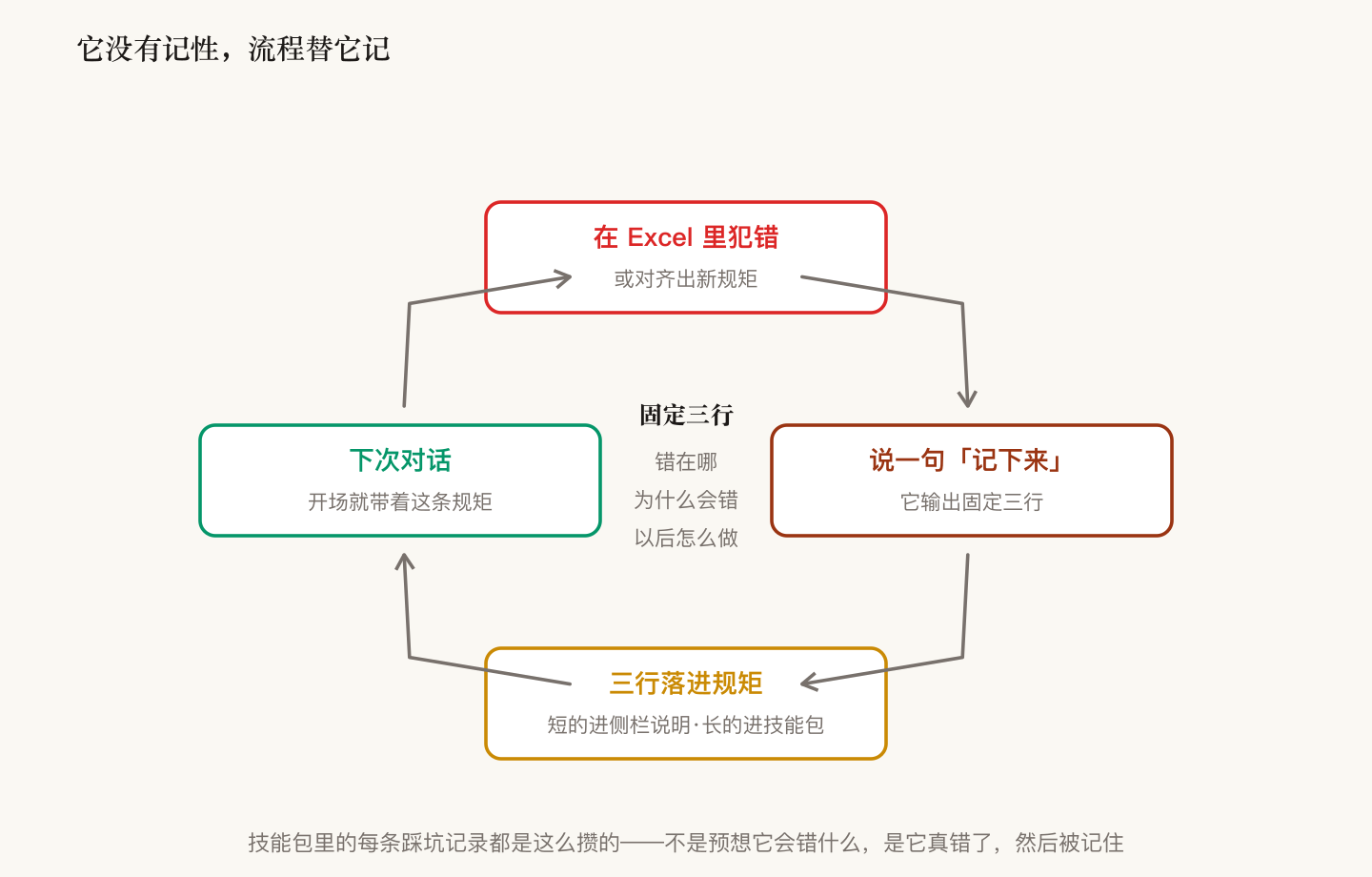
The missing memory is patched with an external loop. When it makes a mistake in Excel, or we align on a new rule, I say "write it down" — and it outputs exactly three lines: what went wrong, why it went wrong, what to do next time. Back on my computer: rules that fit in a sentence get pasted into the sidebar instructions and apply immediately; rules that need context get inserted into a skill package by a single command, repackaged, and re-uploaded once.
Every incident in the table above entered the packages through this loop. Once it's running, the packages get sharper with use — the AI can't remember, but every mistake becomes a rule that's already loaded when the next conversation starts.
The boundary matters too: not every job belongs in the add-in. Cross-workbook aggregation, client-facing deliverable tables, database backfills — those still run through the deterministic pipeline on my computer. The add-in handles only the file that's open, and when in doubt, its standing instruction is "point it out, don't touch it."
Looking back, what this migration actually moved wasn't the tool — it was the rules. Not one lesson from the script era was wasted; they all carried over to a new home and kept working. Tools will keep changing. The AI has no memory, but the process can.