WRITING
Say It Clearly: A Full Postmortem of Working with AI
I recently finished a technical proposal in collaboration with AI — dozens of rounds from drafting through revisions to the final version. It wasn't all smooth; we hit some classic potholes along the way. But the potholes themselves aren't worth much. The postmortem is: lay each one open, and almost every single one traces back to the same thing — when, and in what form, the task's initial conditions and boundary conditions got stated.
So this postmortem points both ways: how I could have briefed better, and which mistakes the AI shouldn't have needed me to catch. The method applies equally to human collaborators — swap "AI" for "the new hire" or "the subcontractor" and not a word needs changing.
Part 1: The timeline — every pothole points at a gap in the briefing
Case 1: Real identity showed up in an anonymous deliverable
What happened: This document was white-label work — submitted under a partner organization's name, with a hard rule that no trace of our identity may appear anywhere. Yet the AI wrote our full organization name into one chapter, and even formally registered an "attribution allowed" rule in the project config.
The root cause wasn't AI sloppiness — it was that I had never said what kind of document this was. The AI modeled the most common scenario (submitting under your own name) and wrote that assumption into a rule. Once a wrong assumption enters the config, every subsequent chapter amplifies it.
The sentence I added afterwards was the real first sentence of the whole project:
"This document is for a partner — it goes out under their name. We only handle the technical content; attribution and credentials are their side of the table."
What is that sentence worth? It's the master switch for dozens of writing decisions across the document: how to refer to ourselves (neutral terms only), how to describe past work (never "we did this"), where source material may come from (public sources only), and whether document metadata must be scrubbed (yes — Word quietly stores the author name in file properties). One sentence before kickoff beats ten rounds of corrections.
Case 2: The "final version" was cleaned — and still had 78 internal codes in it
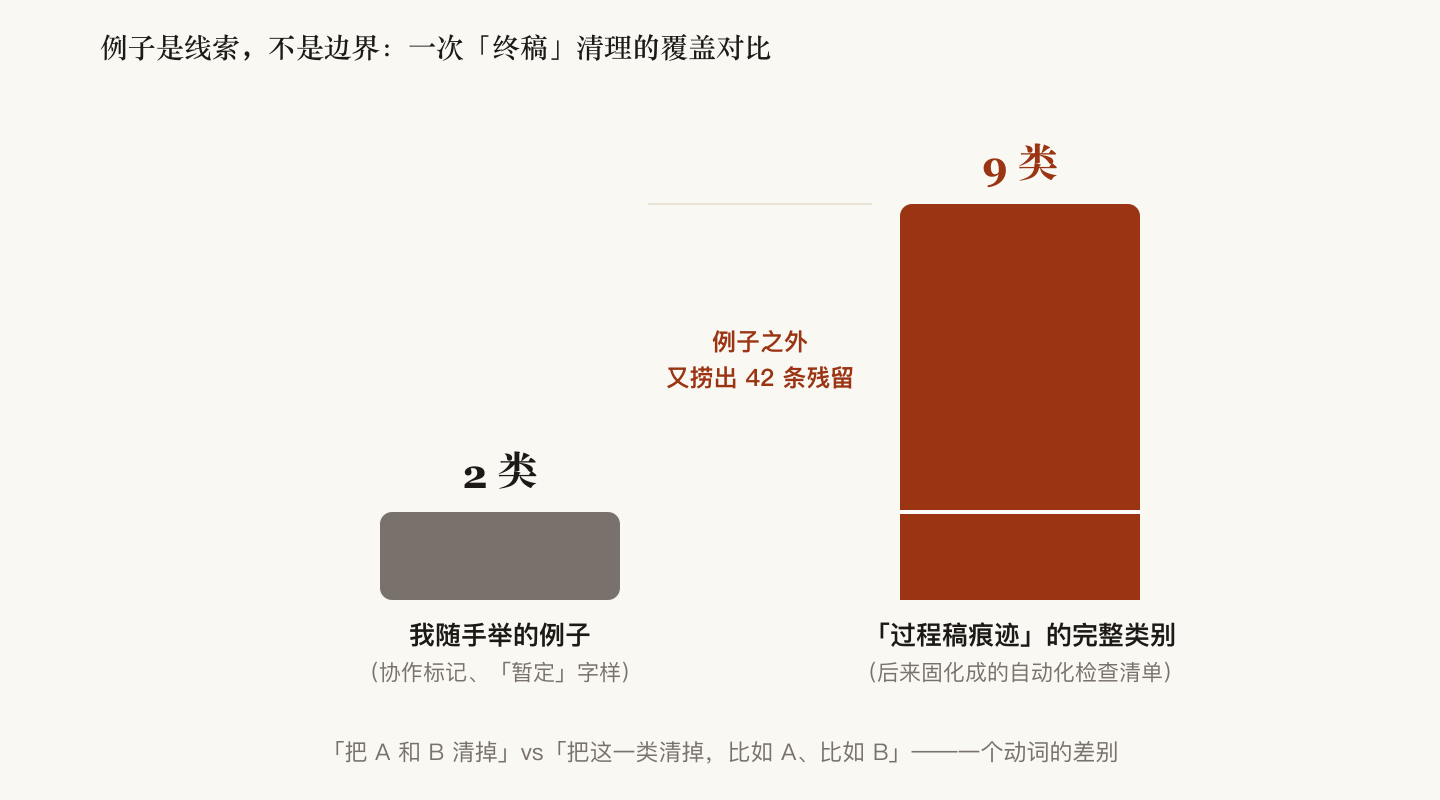
What happened: I said "let's finalize — strip the work-in-progress traces," and offhandedly gave two kinds of examples (collaboration markers, and "tentative" tags on uncertain figures). The AI cleaned exactly what I named, spotlessly, and delivered. A later full sweep dredged up 42 more leftovers outside my examples: scaffolding sentences from the outline phase, reference codes from an internal source library, dead links pointing at deleted sections…
What I said at the time (paraphrased):
"Those were just examples. The rest you need to figure out and extend yourself. What you produce should be a final version, not a half-finished one."
The lesson cuts both ways:
- My side: when a request comes with examples, name the category first, then give examples — "remove every trace of work-in-progress, e.g. A and B," not "remove A and B." Examples are clues for understanding, not the boundary of the requirement.
- AI side: a goal word like "final version" should self-expand into a complete checklist, not a literal execution of the examples. And it eventually did — the sweep got codified into nine categories of automated residue checks. Once a requirement is translated into machine-checkable items, it stops depending on anyone "getting it."
Case 3: A renamed half-finished draft passed as the finished product for three days
What happened: An unfinished intermediate draft got renamed to the delivery filename. From then on everyone — AI included — assumed "it's named that, so it must have been cleaned." Three days later I opened it myself: full of internal codes.
My words:
"The finished product is the finished product. No mixing these up."
The lesson: a filename cannot carry state. "Finished" must be a verified property, not a named one. The rule we set afterwards: any file called "final" gets an automated check run as the very first action upon receipt — trust it only when everything reads zero. The same holds for human teams: at handoff, ask "has it passed the checks," not "is this the final version."
The positive case: removing all cross-references — said clearly once, done right once
What happened: The body text was full of hard-coded cross-references — "see Section X.X," "see Table X-X." The receiving party would later add and delete chapters as they saw fit, so hard-coded numbering meant broken links everywhere. When I raised the request I said three things:
- What: all these cross-references go;
- Why: whoever takes this over will cut and reorder chapters — hard-coded numbers create too much coupling;
- How to decide: propose a plan first; I approve before you touch anything.
The result was the smoothest large change of the whole project: two-hundred-plus paragraphs, three-hundred-plus reference tokens. The AI proposed a treatment per category (which kinds get whole-sentence deletion, which get replaced by section-title descriptions), I made two calls, done in one pass.
Why so smooth? Because the "why" was stated. Knowing the goal was "let the receiver reorder chapters without breaking anything," the AI extended it to places I never pointed at — section numbers embedded inside diagrams, and a "related section" mapping column inside a table. It found those on its own, by following the purpose. Give the purpose, and the executor can think of the rest for you; give only the operation, and they can only do what you said.
Case 4: Word popped "unreadable content" on open
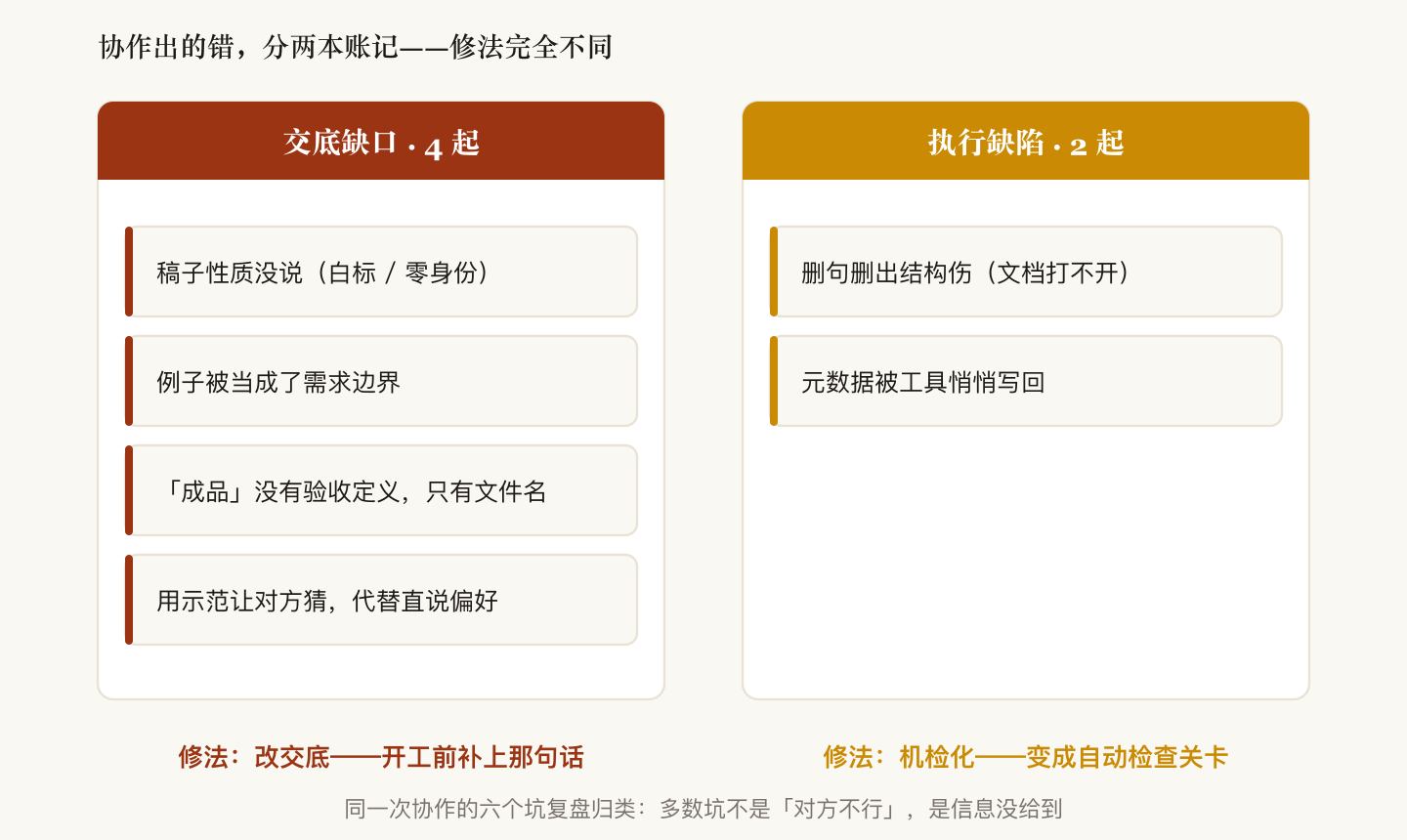
What happened: During that same reference-removal pass, a sentence deletion emptied out the only paragraph inside one table cell. An empty cell violates the Word document format spec — the file threw a repair warning the moment it opened. The text also kept 7 half-deleted sentence stubs.
This one was a pure execution defect — no amount of briefing on my side could have prevented it. What's worth recording is the fix: not "be careful next time," but decomposing the failure into checks wired into an automated gate — after any sentence deletion, scan bracket pairing and document structural validity, always. Any lesson that can become a machine check should never remain a memory.
Cases 5 & 6: Bold text, and the metadata that never stays clean
Bold: Ninety-some paragraphs carried heavy bold spans. I hand-fixed a few in Word as a demonstration and expected the AI to follow. It began earnestly reverse-engineering my sample style, preparing an elaborate "keep short lead-in labels bold" scheme — until I interrupted:
"Actually you can just unbold everything. Why make it complicated."
This lesson is on me: I should have stated the preference itself ("no bold in body text") instead of demonstrating and making the other side infer. Demonstrations invite over-interpretation into elaborate rules. If a preference fits in one sentence, don't make anyone guess it from examples.
Metadata: I edited the draft in Word and saved — and Word wrote my author name right back into the file properties, on a deliverable whose metadata must stay empty. The automated check caught it on the spot. The systemic lesson: "scrubbed once" does not mean "clean forever." If anyone touches the file again, the check must re-run after the last edit.
Part 2: The distilled briefing template (for AI, and for any contractor)
Flip the potholes over and you get a kickoff checklist:
1. Initial conditions (what kind of job is this) — three facts in one sentence
Under whose name · for whose eyes · who takes over next
Example: "This is white-label (not under our name; the client submits it as their own), it goes to anonymous reviewers, and someone downstream will restructure chapters."
These three facts respectively determine: identity discipline, wording stance, and how much coupling you can afford. The most expensive pothole (identity leak) and the smoothest collaboration (reference removal) both hinged on this one sentence — unsaid in the former, said in the latter.
2. Boundary conditions — say what NOT to do first
Beyond "do X," spend one sentence fencing off "don't do Y, don't touch Z":
- ✅ "Write this chapter; do not write the staffing section (separate track), do not invent chapters outside the outline"
- ✅ "Clean the residue, but not a single number may change; the 'sim' in 'simulation' doesn't count as a tentative tag"
Negative boundaries are far cheaper than positive requirements: the cost of one sentence versus the cost of rework after a wrong turn.
3. The correct use of examples — category first, then examples
- ❌ "Delete 'to be merged' and '(tentative)'" — they will delete exactly those two
- ✅ "Remove all work-in-progress traces — e.g. 'to be merged', e.g. '(tentative)' — sweep the rest of the category yourself"
One verb of difference: "delete these" vs "clear this category."
4. State intent, not just operations
"These references go, because the person taking over will reorder chapters — too much coupling" — that second half is what let the executor find the twenty-plus in-figure numbers I never saw. Intent generalizes; operations don't.
5. Where acceptance criteria live — the gate goes after the last edit
- "Final" is not a status word; it's a set of runnable checks: residue scan, identity scan, document structural validity, print readiness.
- Whoever touched the file last — including me hitting Save in Word — the checks re-run after that. Word writes the author name back on every save; a tool's side effects don't care about your relationship with it.
6. Their ignorance of your industry is your information debt
"I assumed you'd know" is the most expensive sentence. White-label, consolidated drafting, anonymous review — common sense in my head, blank space in the executor's. Define a term of art in one sentence the first time it appears, and it becomes usable vocabulary forever after — once I spent a sentence explaining what "white-label draft" meant, every later conversation skipped a paragraph of background.
Part 3: The AI side of the ledger (same for human contractors)
A postmortem that only audits the client is half a postmortem. These are things the executor owes regardless of briefing quality:
- Ask about the frame before starting — especially master-switch questions like attribution and audience. Default assumption + silent execution = amplifying the client's risk across the whole document. The standing rule now: if the delivery's nature is unstated, the first sentence of work is a question.
- Goal words self-expand. "Final," "wrap up," "deliver" — execute the full checklist, don't wait for itemized naming.
- Examples auto-generalize. On receiving an example, first ask "what category is this an instance of," then sweep the whole category before calling it done.
- Lessons must become machine checks. The same class of error appearing twice is a disgrace — bracket pairing, empty table cells, metadata write-back: every pothole ended up as an automated gate. "I'll remember" is not a fix; "this class of error can no longer structurally slip through" is.
- Finished status comes from verification, not from names. The first action on receiving anything "done" is to verify, not to trust.
Part 4: The one-page card
Kickoff briefing (30 seconds):
Nature:     under whose name / for whose eyes / who takes over
Goal:       what you want (one sentence)
Why:        why you want it (one sentence — so they can generalize)
No-go:      what not to do / not to touch
Acceptance: what "done" means (runnable checks, not adjectives)
Jargon:     define this task's terms of art up front
During:
- When giving examples, attach the category name
- State preferences directly; don't demonstrate and make them guess
- Book their errors in two ledgers: information never given (fix the briefing) vs execution defects (demand machine checks)
At the end:
- "Final" = all checks green, not a renamed file
- Whoever made the last edit, the gate goes right after it
Quotes lightly paraphrased; project details anonymized. Treat this as a reusable briefing template — next kickoff, run the 30-second card first.